
A blog series is one of the best ways to build authority on a topic: several connected posts that each answer one question well and link to each other. WordPress makes publishing easy. The hard part is planning the series and keeping it going.
This guide shows you how to plan a series, draft it with Claude, check it, and schedule it in WordPress so it publishes on time. It is the same process we used to plan this series.
Quick summary
- Plan the whole series first: one main topic, five to ten posts, each answering one question.
- Draft with Claude, then add your own experience and check every fact.
- Link every post to the others in the series and to one service or product page.
- Schedule posts in WordPress so the series publishes steadily.
- Quality over volume: Google warns against large amounts of AI text without oversight.
What changed recently
- September 24, 2026: Google’s September 2026 spam update started (see Google’s ranking updates page). Google’s spam policies describe scaled content abuse as generating many pages mainly to manipulate rankings. A planned series of genuinely useful posts is the opposite of that.
- Updated October 5, 2026: Google’s guidance on creating helpful content says “Why” is “perhaps the most important question to answer about your content.” Every post in your series should have a clear reason to exist for your reader.
Step by step: from topic list to scheduled posts
1. Choose one main topic
Pick a topic your customers care about and that connects to what you sell, for example “AI optimization for online stores”. Write one sentence that says who the series is for and what they will be able to do by the end.
2. List the questions, then pick five to ten
Collect questions from customers, sales calls, support tickets and Search Console. Group similar ones. Each group becomes one post. Put them in an order that makes sense to a reader starting from zero.
3. Write a one-page brief for each post
- The question the post answers, in the reader’s words.
- What the reader will be able to do after reading.
- Your own experience, examples or data to include.
- The posts and pages it should link to.
4. Draft, then add what only you know
Use Claude to turn each brief into a draft. Then edit it: add your team’s experience, real examples and screenshots, and cut anything generic. This is the step that makes the series worth reading.
5. Set up categories, featured images and SEO fields
Put the series in one category so it is easy to browse. Give every post a featured image in the same style. Fill in the SEO title and meta description in your SEO plugin.
6. Schedule the posts
In the WordPress editor, open the post settings, click the publish date, choose a future date and time, and click Schedule. Scheduling one post a week keeps the series steady and gives you time to update links as new posts go live.
7. Link the series together
Each post should link to the next post, to the first post, and to one or two related pages on your site. When a new post goes live, go back and add a link to it from the previous one.
Expert tip
Keep a simple table of the series: post number, title, URL, publish date and status. Update it every week. It is the easiest way to keep links correct.
Do it faster with Claude
Claude can do the planning and first drafts. WooCommerce has also published an experimental WooCommerce for Claude plugin that lets Claude read store data, which helps when your series is about your products. Treat it as a developer preview.
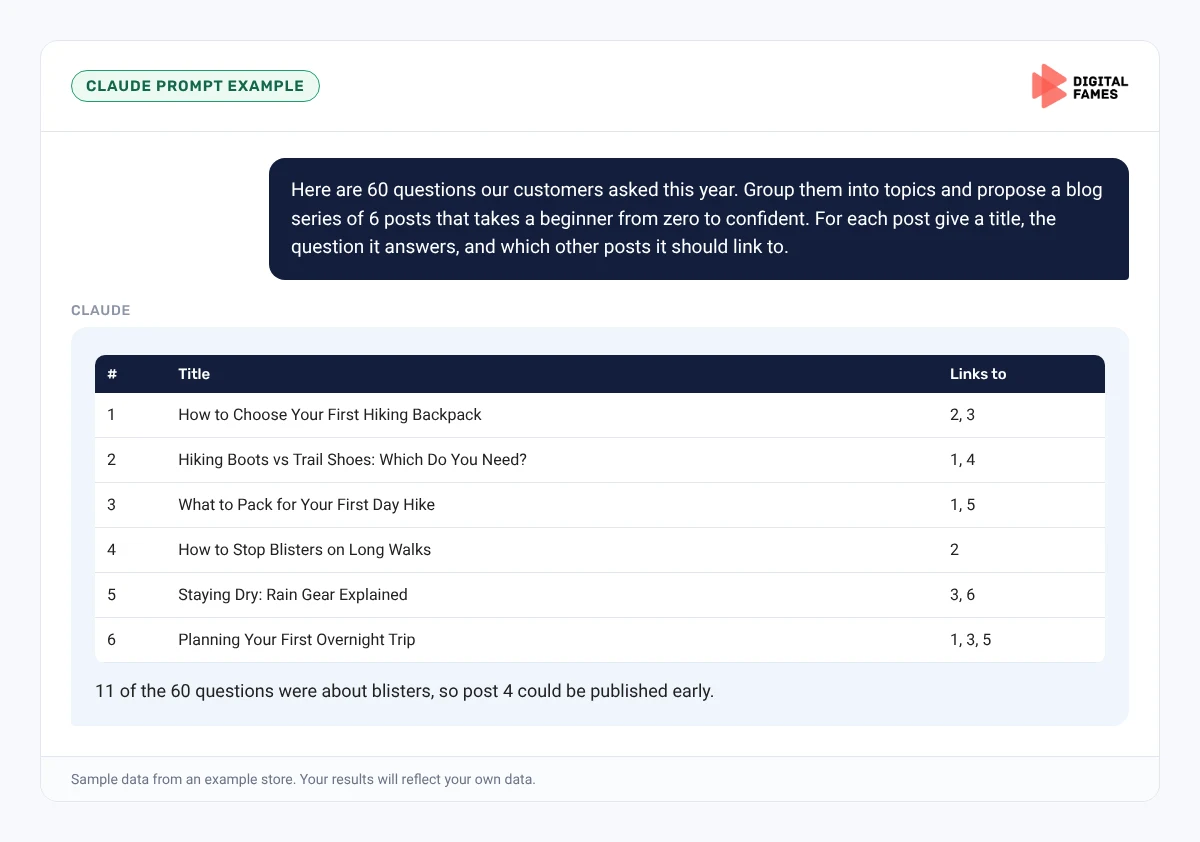
Prompt 1: plan the series
Claude prompt
Here are 60 questions our customers asked this year. Group them into topics and propose a blog series of 6 posts that takes a beginner from zero to confident. For each post give a title, the question it answers, and which other posts it should link to.
Prompt 2: draft from a brief
Claude prompt
Using this brief and our notes, write a 1,200-word draft. Answer the main question in the first paragraph. Use short sentences, H2 and H3 headings, and no long dashes. Mark every place where I should add a real example or screenshot.
Prompt 3: link check
Claude prompt
Here are the titles and URLs of every post in the series. For this draft, suggest where to link to the previous post, the next post and the first post, quoting the exact sentence for each.
Common mistakes to avoid
- Publishing all posts on one day with no internal links.
- Series topics that have nothing to do with what you sell.
- AI drafts published without editing.
- Forgetting to add links back from older posts to newer ones.
- Different featured image styles on every post.
How to tell if it is working
After two to three months, check Search Console for impressions and clicks on the series URLs, and see which posts lead readers to your service or product pages in Google Analytics. Our guide on AI search data in Google Search Console explains the AI reports.
Frequently asked questions
How many posts should a blog series have?
Five to ten is a good size. Enough to cover a topic well, small enough to finish.
How do I schedule a post in WordPress?
In the editor, open the post settings, click the publish date, choose a future date and time, and click Schedule.
Can I use AI to write my blog series?
Use it for planning and drafts. Add your own experience and check every fact before publishing.
Should every post link to every other post?
Not necessarily. Link to the next, the first and one or two closely related posts so the links stay useful.
Related guides: A Weekly Shopify Blog Workflow with Claude: From Topic to Published Post and Publishing on BigCommerce with Claude: Blog and Product Content. Browse all our WordPress SEO guides.
Next in this series
Start the next series: Wix Stores and AI Search: How to Use the AI Visibility Overview.
Missed the start? Read Is Your WooCommerce Store Ready for AI Shopping? A Simple Checklist.
Want a content series planned and built for your site? See our WordPress development and AI SEO services, or talk to our team.