
When an AI assistant recommends products, it pulls facts from pages it trusts: sizes, materials, prices, who a product suits, how it compares. If your Wix product and category pages do not state those facts clearly, the assistant uses someone else’s page.
This guide shows you how to structure Wix Stores product and category pages so they are easy for shoppers to scan and easy for Google and AI tools to quote.
Quick summary
- Write product pages that answer the questions shoppers ask before buying.
- Put key facts in text, not only in images.
- Add a short buying guide and FAQ to your main category pages.
- Set the title tag (up to 60 characters) and meta description (up to 156) in each product’s SEO settings.
- Use Claude through Wix’s connector to draft rewrites, then check every fact.
What changed recently
- September 24, 2026: Google’s September 2026 spam update started (see Google’s ranking updates page). Google’s spam policies list copying content without adding value as spam. Supplier text pasted on every product is a risk.
- Current guidance: Google’s AI features and your website page asks site owners to keep important content in text and make it easy to find through internal links.
Product pages AI can quote
1. A title that says what it is
Brand, product type and the key detail, in plain words: “Summit 30L Hiking Backpack with Rain Cover”. Not “Summit”.
2. A first paragraph that answers “is this for me?”
Two or three sentences on who the product is for and the main reason to choose it. AI answers often quote the opening lines of a page.
3. Facts in text, not just in pictures
Many Wix stores show size charts and specs only as images. Add them as text too: a short spec list or table with materials, dimensions, weight and care.
4. A short FAQ
Four to six questions with two-sentence answers: sizing, fit, care, delivery, returns. Use your real policies.
5. SEO settings for every product
From Wix Help Center: open Products in your dashboard, select a product and choose Edit SEO Settings. In SEO basics, set the title tag (Wix recommends up to 60 characters) and meta description (up to 156). If you change the URL slug, keep the toggle on that redirects visits from the old URL.
6. Product structured data that matches
Google’s merchant listing documentation requires name, image and an offer with price and currency, and recommends GTIN, brand, color, size, shipping and returns. Check a few Wix product pages in Google’s Rich Results Test and confirm the price and availability match the page.
Category pages AI can quote
Google’s guide to ecommerce site structure recommends menus that link to categories, and categories that link to every product you want found. Make your main category pages useful in their own right:
- An 80 to 150 word buying guide above the products.
- Clear links to related categories.
- A short FAQ below the products.
- A title tag and meta description written for shoppers.
Expert tip
Use your Wix AI Visibility Overview to find questions where you are not mentioned. Each one is a clue about what your category pages should answer.
Do it faster with Claude
Wix offers an MCP connector so Claude can read and update your site’s content with your permission. Start by asking Claude to suggest changes without saving them.
Prompt 1: rewrite a product page
Claude prompt
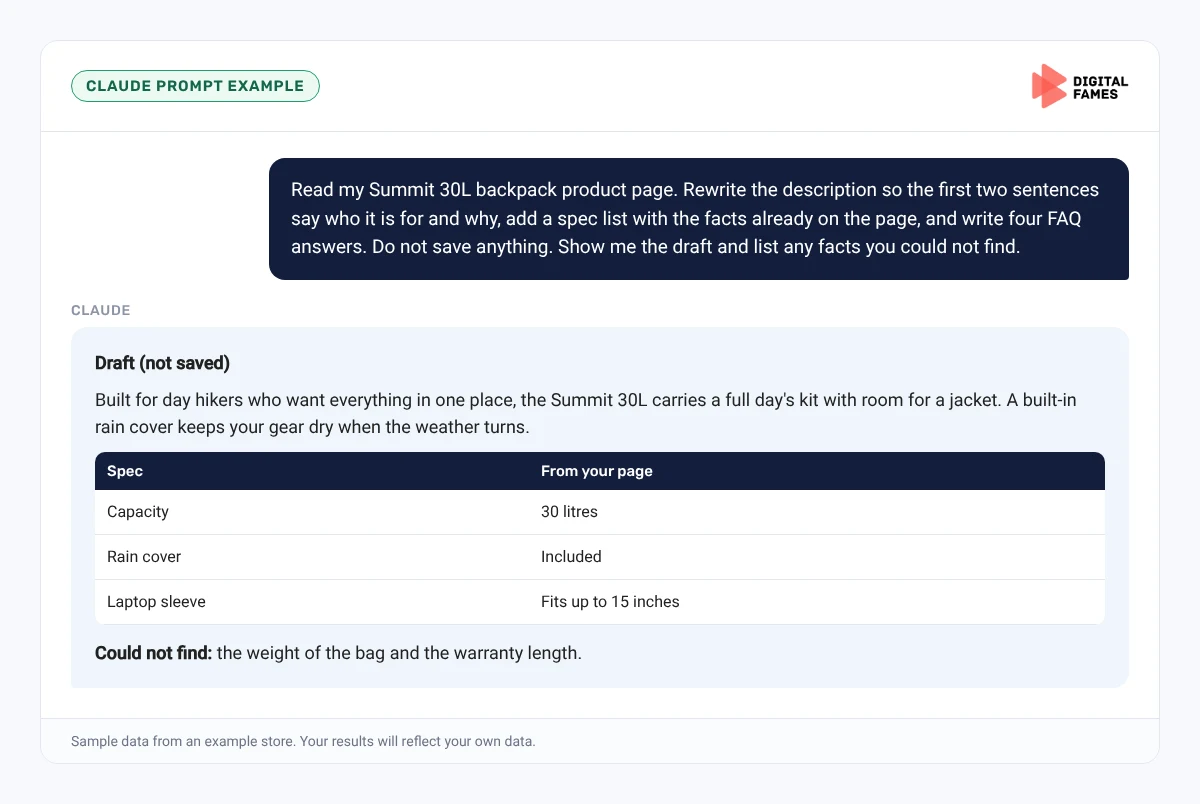
Read my Summit 30L backpack product page. Rewrite the description so the first two sentences say who it is for and why, add a spec list with the facts already on the page, and write four FAQ answers using my shipping and returns policies. Do not save anything. Show me the draft and list any facts you could not find.
Prompt 2: category buying guide
Claude prompt
Write a 120-word buying guide for my Hiking Backpacks category. Explain how to choose a size by trip length and mention our three backpack sizes. Use only facts from the product pages.
Common mistakes to avoid
- Specs only inside images.
- The same description on every color of a product.
- Changing URL slugs without a redirect.
- Category pages with no text at all.
- Letting AI save changes without a person checking them.
How to tell if it is working
Run the same questions in the Wix AI Visibility Overview a month after your changes, and compare Search Console impressions for the updated pages. Our guide to AI search data in Google Search Console explains Google’s reports.
Frequently asked questions
Where do I change a product’s SEO title on Wix?
Go to Products, select the product, click Edit SEO Settings and edit the title tag in SEO basics.
How long should a Wix product description be?
Long enough to answer the questions shoppers ask before buying. For most products, 150 to 300 words plus a spec list and FAQ.
Do I need FAQ schema for AI answers?
No. Google says no special schema is needed for AI features. Clear, visible answers matter most.
Can Claude edit my Wix products directly?
Through Wix’s MCP connector it can, with your permission. Have it show drafts first and approve each change.
Related guides: Turning Shopify Collection Pages into Pages AI Answers Quote and Shopify Product Pages AI Can Read: Titles, Descriptions and Schema Made Simple. Browse all our Wix SEO guides.
Next in this series
Next in the Wix series: Running a Wix Blog Series with Claude: Plan, Write and Publish.
Missed the start? Read Wix Stores and AI Search: How to Use the AI Visibility Overview.
Want product and category pages that get cited? See our AI SEO services and web development services, or talk to our team.