
A blog is one of the easiest ways for a Shopify store to show up for questions people ask before they are ready to buy. The problem is time. Most store owners start a blog, publish three posts and stop.
This guide gives you a weekly workflow that takes about two hours, using Claude to do the heavy lifting and you to do the checking. By the end you will have a repeatable process for one helpful post a week, linked to the right products and collections.
Quick summary
- Plan topics from real customer questions, not keyword lists alone.
- Write one useful post a week, linked to a collection and a few products.
- Use Claude for outlines, drafts and internal link suggestions.
- A person adds real experience, checks facts and approves before publishing.
- Publish in Shopify under Online Store, Blog posts.
What changed recently
- September 24, 2026: Google’s September 2026 spam update started (see Google’s ranking updates page). Google’s spam policies call out scaled content abuse, where many pages are generated mainly to manipulate rankings. Publishing dozens of thin AI posts a week is the wrong way to use AI.
- Updated October 5, 2026: Google’s guidance on creating helpful content says using generative AI “to produce large amounts of text without manual oversight or curation represents little to no effort”. One checked post a week beats twenty unchecked ones.
The weekly workflow
Monday: pick the topic (20 minutes)
Keep a running list of questions from customer emails, chats, reviews and Search Console queries. Each week pick one question that relates to products you sell. Good topics sound like a shopper talking: “How do I choose a hiking backpack size?”
Tuesday: outline and draft (40 minutes)
Ask Claude for an outline first, review it, then ask for the draft. A good post for a store is 800 to 1,500 words, answers the question in the first paragraph, and includes a short section on which products fit which need.
Wednesday: add what only you know (30 minutes)
This is the step that makes the post worth reading. Add a tip from your team, a photo you took, a common mistake you see in returns, or a comparison you tested yourself. Google asks whether content provides “original information, reporting, research, or analysis”. Your experience is the original part.
Thursday: links, images and SEO fields (20 minutes)
- Link to one collection and two or three products in natural places.
- Link to one or two older posts on related topics.
- Add a featured image and alt text for every image.
- Set the search engine listing: a title of about 60 characters and a meta description of about 160.
Friday: publish and share (10 minutes)
In Shopify, go to Online Store > Blog posts, add the post, choose the blog, set visibility and publish. Then link the new post from a related product page or collection so it is easy to find.
Expert tip
Keep a simple spreadsheet of every post with its main question, the collection it links to and the date. After three months you will see which topics bring visitors and sales.
Do it faster with Claude
With Claude’s Shopify connector (see part 1), Claude can read your products and collections, so its link suggestions are real pages, not guesses.
Prompt 1: outline from a real question
Claude prompt
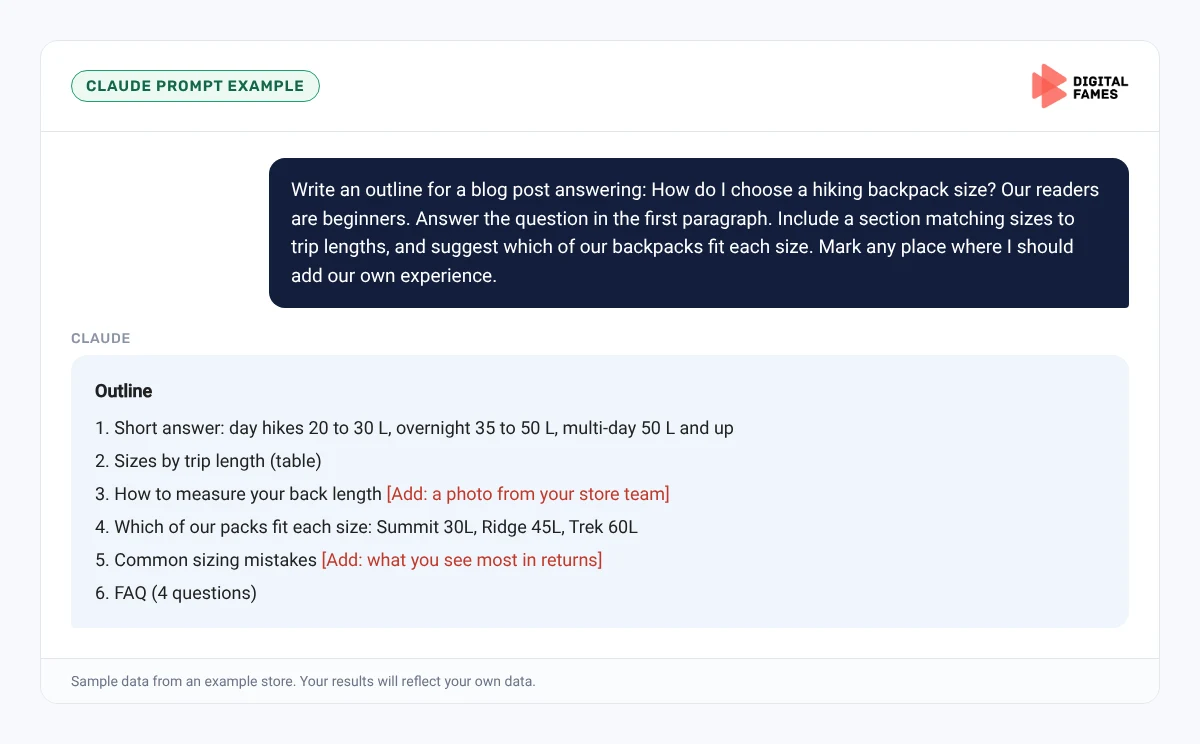
Write an outline for a blog post answering: How do I choose a hiking backpack size? Our readers are beginners. Answer the question in the first paragraph. Include a section matching sizes to trip lengths, and suggest which of our backpacks fit each size. Mark any place where I should add our own experience.
Prompt 2: internal links
Claude prompt
Here is my finished draft. Suggest up to five internal links to our collections, products or older posts, with the exact sentence where each link should go. Only use pages that exist in our store.
Prompt 3: final check
Claude prompt
Check this post for facts that are not supported by our product data, sentences longer than 25 words, and any claims that sound like a guarantee. List them with a suggested fix.
Common mistakes to avoid
- Publishing AI drafts without adding your own experience.
- Topics that have nothing to do with what you sell.
- No links to products or collections, so the post never helps sales.
- Publishing in bursts, then stopping for months.
- Copying competitors’ posts and rewording them.
How to tell if it is working
After two to three months, check Search Console for impressions and clicks on your blog URLs, and Shopify Analytics for sessions that start on a blog post and end in a sale. Our guide on AI search data in Google Search Console explains the AI reports.
Frequently asked questions
How often should a Shopify store publish blog posts?
Once a week is a good, sustainable pace for most stores. Consistency matters more than volume.
Can I publish AI-written blog posts on Shopify?
You can use AI to help, but have a person add real experience, check every fact and approve the post. Google warns against large amounts of AI text without oversight.
Where do I add a blog post in Shopify?
Go to Online Store, then Blog posts, and click Add blog post.
How long should a store blog post be?
Long enough to fully answer the question. For most store topics that is 800 to 1,500 words.
Related guides: Publishing a WordPress Blog Series with Claude: From Topic List to Scheduled Posts and Running a Wix Blog Series with Claude: Plan, Write and Publish. Browse all our Shopify SEO guides.
Next in this series
Start the next series: Is Your WooCommerce Store Ready for AI Shopping? A Simple Checklist.
Missed the start? Read How to Get Your Shopify Store Recommended in ChatGPT, Gemini and Google AI Mode.
Want help building a content plan for your store? See our eCommerce SEO services or talk to our team.