

Many WooCommerce stores sell products made by other brands, and many of those stores use the same manufacturer description as everyone else. Some also have hundreds of variation pages that are nearly identical. For years this was common. After Google’s September 2026 spam update, it is worth fixing.
This guide shows you how to find thin and duplicate product content on your store, decide what to rewrite, merge or leave, and fix it safely in batches.
Quick summary
- Google’s spam policies describe republishing content “without adding any original content or value” as spam.
- Find copied descriptions, near-duplicate products and empty pages first.
- Rewrite your best sellers, merge true duplicates, and add canonicals where needed.
- Use AI for drafts, but a person adds real knowledge and checks every fact.
- Fix in batches of 20 to 50 and measure before moving on.
What changed recently
- September 24 to October 8, 2026: Google ran its September 2026 spam update, listed on Google’s ranking updates page. It took almost 14 days to roll out across all languages.
- Updated October 5, 2026: Google’s guidance on creating helpful content asks whether content provides “original information, reporting, research, or analysis”.
Google’s spam policies list
“Republishing content from other sites without adding any original content or value” (Google’s spam policies)
Step 1: find the problem pages
Copied manufacturer descriptions
Take a sentence from five product descriptions and search for it in quotes on Google. If dozens of other stores show the same text, that product needs original content.
Near-duplicate products
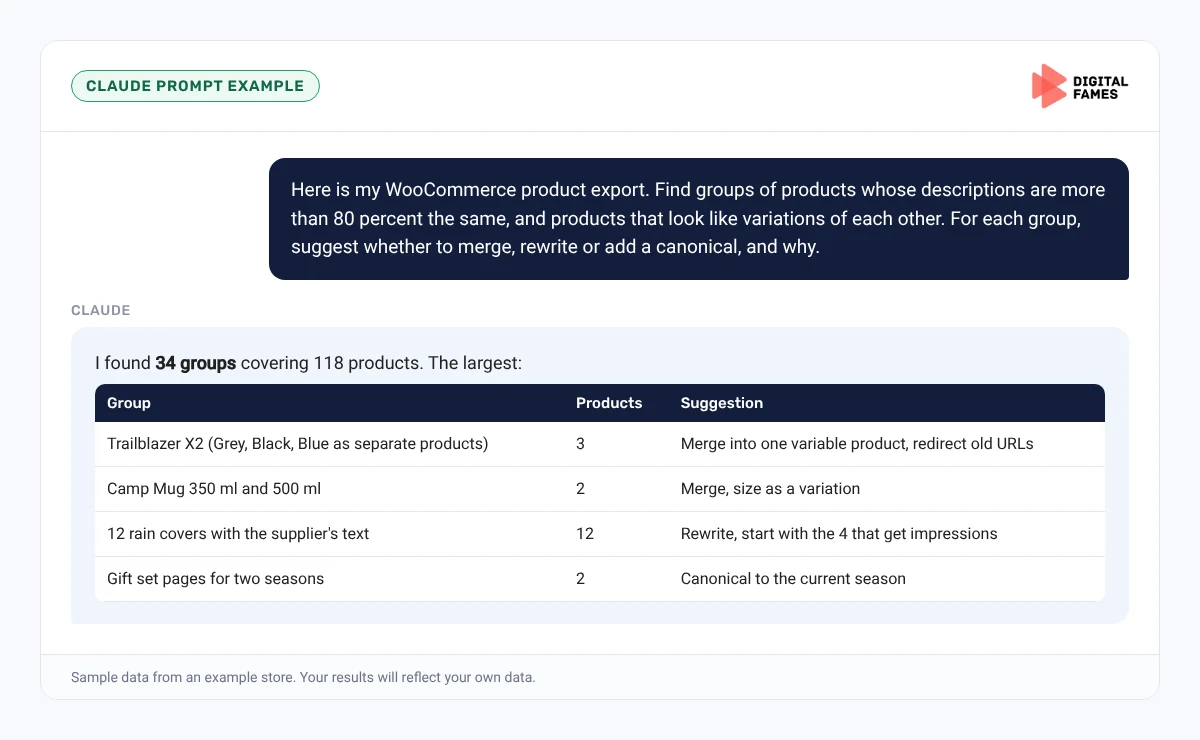
Look for separate products that differ only by color or size. These usually belong as variations of one product, not as separate pages with the same text.
Thin pages
Export your products and sort by description length. Products with fewer than 50 words, no images beyond one, and no specs are thin.
Step 2: decide what to do with each page
- Rewrite: best sellers and products with search impressions. Add original details, real answers and better images.
- Merge: separate products that are really variations. Combine them into one variable product and redirect the old URLs to it.
- Canonical: pages that must exist separately but are near-identical. Point them to the main version. Google’s guide to consolidating duplicate URLs says redirects and rel=canonical are strong signals.
- Remove or noindex: old products you no longer sell and will not restock, after redirecting any that have links or traffic.
Watch out
Do not use robots.txt to handle duplicates. Google’s canonicalization guide lists this as a common mistake, because blocked URLs can still be indexed without their content.
Step 3: rewrite with real value
A good rewrite is not the same text with different words. Add what only your store can say:
- Who the product suits and who should pick something else.
- Sizing advice from your own returns and customer feedback.
- Real photos and short videos.
- Answers to the questions your team gets about this product.
- How it compares with the other options you stock.
Step 4: fix in batches
Work on 20 to 50 products at a time, starting with the ones that already get impressions. Note the date of each batch. After four to six weeks, compare impressions and clicks for that batch before deciding whether to scale up.
Do it faster with Claude
Prompt 1: find duplicates in your export
Claude prompt
Here is my WooCommerce product export. Find groups of products whose descriptions are more than 80 percent the same, and products that look like variations of each other (same name with a different color or size). For each group, suggest whether to merge, rewrite or add a canonical, and why.
Prompt 2: rewrite plan with human steps
Claude prompt
For these 20 products, write a rewrite brief for each: what to keep, what original information we need to add from our team, and three questions the new description must answer. Do not write the descriptions yet.
Why a brief first: it forces a person to add the original part. Claude can then draft from the brief and your team’s notes, and someone checks every fact before it goes live.
Common mistakes to avoid
- Spinning the manufacturer text with an AI tool and calling it original.
- Deleting old products without redirecting URLs that have links or traffic.
- Blocking duplicates in robots.txt instead of using canonicals or redirects.
- Rewriting 2,000 products in one go with no way to measure what helped.
- Forgetting to update the Google feed after merging products.
How to tell if it is working
Track each batch in Search Console. Compare impressions and clicks for the batch URLs before and after. Google notes that recovery from spam issues can take months of compliance, so measure over weeks, not days. See our guide on AI search data in Google Search Console for the AI reports.
Frequently asked questions
Is using the manufacturer’s description a penalty?
Not automatically. But Google’s spam policies describe republishing content without adding original value as spam, and copied text gives shoppers and AI tools no reason to choose your page.
Should I merge color variations into one product?
Usually yes. One variable product with its own images, prices and stock per variation is clearer for shoppers and for Google.
How long does recovery take after fixing content?
It can take months. Google’s systems need time to see that a site consistently follows the policies.
Can I use AI to rewrite product descriptions?
Yes, as a drafting tool. Google warns against large amounts of AI text without oversight, so a person must add real knowledge and check every page.
Related guides: Bulk Product Content on Magento with Claude, Without Losing Your Brand Voice and Shopify Product Pages AI Can Read: Titles, Descriptions and Schema Made Simple. Browse all our WooCommerce SEO guides.
Next in this series
Next in the WooCommerce series: Publishing a WordPress Blog Series with Claude: From Topic List to Scheduled Posts.
Missed the start? Read Is Your WooCommerce Store Ready for AI Shopping? A Simple Checklist.
Need help cleaning up a large catalog? Our eCommerce SEO and SEO audit teams can help. Talk to us.