Filters help shoppers find the right product. They can also create thousands of URL combinations that search engines try to crawl, while your real category pages get less attention. On a BigCommerce store with a large catalog, getting this balance right matters.
This guide explains how to make category pages worth ranking, and how to keep filters useful for shoppers without wasting crawling.
Quick summary
- Category pages should link to every product you want found and explain the category in a short guide.
- Faceted navigation can create near-endless URL combinations. Google explains how to manage them.
- Create real category pages for filter combinations people actually search for.
- Keep URLs consistent and return a 404 for filter combinations with no results where you can.
- Claude can write category copy at scale from your product data.
What changed recently
- September 24, 2026: Google’s September 2026 spam update started, listed on Google’s ranking updates page. Auto-generating pages for every filter combination with thin text is the kind of scaled content Google’s spam policies warn about.
- Current guidance: Google’s AI features and your website page says the normal SEO basics apply to AI features, including internal links that make content easy to find.
Make category pages worth ranking
Google’s guide to ecommerce site structure recommends linking from menus to categories, from categories to subcategories, and from categories to every product you want indexed. It also notes that pages with more internal links are generally treated as more important.
- Add an 80 to 150 word buying guide at the top of each main category.
- Add a short FAQ below the products with real customer questions.
- Link to related categories and subcategories.
- Write a unique page title and meta description for each category.
Understand your filters
BigCommerce’s Product Filtering lets shoppers filter by brand, price, rating, product options, custom fields and more. It is available on Pro and Enterprise plans with supported themes, under Products > Product Filtering.
Every filter combination can become its own URL. Google’s faceted navigation guidance explains the risk: overcrawling of filtered URLs and slower discovery of new useful pages.
What Google recommends
If filtered pages should not be crawled
- Use robots.txt to disallow crawling of filter parameter URLs, while allowing the main category URL.
- rel=canonical pointing to the unfiltered page can help over time, but Google says it is generally less effective than robots.txt.
- rel=nofollow on filter links only helps if every link to that URL has it.
If some filtered pages should be crawled
- Use the standard & separator for URL parameters.
- Keep the order of filters the same and prevent duplicate filters in one URL.
- Return a 404 status for filter combinations with no results.
Expert tip
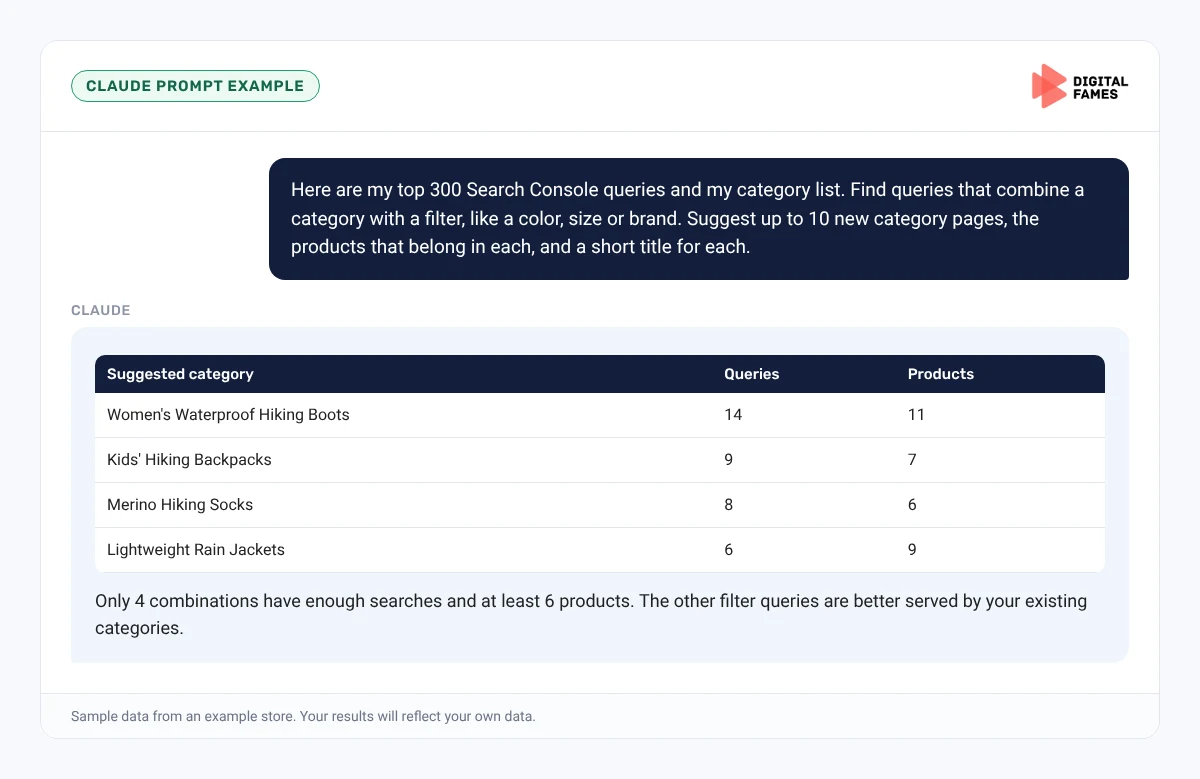
Before you change robots.txt, list which filtered URLs get impressions in Search Console. If a combination like “women’s waterproof hiking boots” gets real searches, make it a proper category page with its own copy instead of relying on a filter URL.
Watch out
Never block your main category or product URLs. Test every robots.txt change with a few real URLs before and after.
Do it faster with Claude
Prompt 1: find filter combinations worth a page
Claude prompt
Here are my top 300 Search Console queries and my category list. Find queries that combine a category with a filter, like a color, size or brand. Suggest up to 10 new category pages, the products that belong in each, and a short title for each.
Prompt 2: category copy at scale
Claude prompt
For each of these 20 categories, write a 100-word buying guide and three FAQ answers using only the product data provided. Use a friendly, plain style with short sentences. Flag any category where the products do not have enough information to write useful copy.
What to check: each category’s text is different and specific, and every claim is supported by the products in it.
Common mistakes to avoid
- Letting every filter combination be crawled on a large catalog.
- Blocking main category URLs by accident in robots.txt.
- The same buying guide pasted on every category.
- Categories with no links to their products.
How to tell if it is working
In Search Console, watch the Crawl Stats report for fewer requests to filter URLs, and impressions on your main category pages. See our guide on AI search data in Google Search Console for the AI reports.
Frequently asked questions
Should I block filtered URLs on BigCommerce?
If filtered URLs do not need to appear in search, Google recommends disallowing them in robots.txt while keeping main category pages crawlable.
Is canonical enough for filter pages?
It can help, but Google says it is generally less effective than robots.txt for reducing crawling of filtered URLs.
Which BigCommerce plans have product filtering?
BigCommerce lists Pro and Enterprise plans with a supported theme.
How long should category text be?
Around 80 to 150 words at the top and a short FAQ below the products is enough for most categories.
Related guides: Turning Shopify Collection Pages into Pages AI Answers Quote and Magento SEO for AI Search: Fixing Crawl Waste on Large Catalogs. Browse all our BigCommerce SEO guides.
Next in this series
Next in the BigCommerce series: Publishing on BigCommerce with Claude: Blog and Product Content.
Missed the start? Read BigCommerce Product Feeds for AI Shopping: Getting Your Catalog into Google AI Mode.
Need help with a large catalog? Our technical SEO and eCommerce SEO teams can help. Talk to us.