

BigCommerce gives you a built-in blog and a solid product catalog. What most stores lack is a steady process for creating helpful content for both. This guide gives you a simple weekly workflow using Claude for drafts and your team for the expertise.
Quick summary
- Use the built-in blog under Storefront, Blog for helpful, question-led posts.
- Improve product content in small batches, starting with best sellers.
- Claude drafts from your product exports and notes. A person checks and approves.
- Link every post to a category or product, and every product to related content.
- Keep a simple log so you can measure what helped.
What changed recently
- September 24, 2026: Google’s September 2026 spam update started (see Google’s ranking updates page). Google’s spam policies describe scaled content abuse as generating many pages mainly to manipulate rankings.
- Updated October 5, 2026: Google’s helpful content guidance says AI-generated text “without manual oversight or curation” represents little to no effort. Use AI to save time, not to skip the review.
The blog workflow
Plan from real questions
Collect questions from customer emails, reviews and Search Console. Pick one a week that leads to your products.
Draft with Claude, finish with your team
Ask Claude for an outline, then a draft. Your team adds a real tip, photo or example, and checks every fact.
Publish on BigCommerce
From BigCommerce Help: go to Storefront > Blog, click the + button, add a title and body, set the post URL and meta description, then click Publish or Save Draft. If you change a post URL, BigCommerce creates a 301 redirect from the old one by default.
The built-in blog does not describe automatic scheduling, so save drafts and publish them on your planned day.
The product content workflow
Pick a batch
Each week, pick 20 to 30 products, starting with best sellers and products that get impressions but few clicks.
Brief, draft, check
- Write a short brief per product: who it is for, key facts, common questions.
- Have Claude draft a description from the brief and the product data.
- A team member checks every fact and adds anything only you know.
- Update titles, descriptions, meta descriptions and identifiers in BigCommerce.
Link products and content
Add links from blog posts to the products they mention, and from product descriptions to helpful guides where it makes sense.
Expert tip
Keep a simple sheet: product or post, date changed, and what changed. After six weeks you can see which changes moved impressions and clicks.
Do it faster with Claude
Export products from BigCommerce as a CSV and share them with Claude, along with your notes and brand voice examples.
Prompt 1: product description batch
Claude prompt
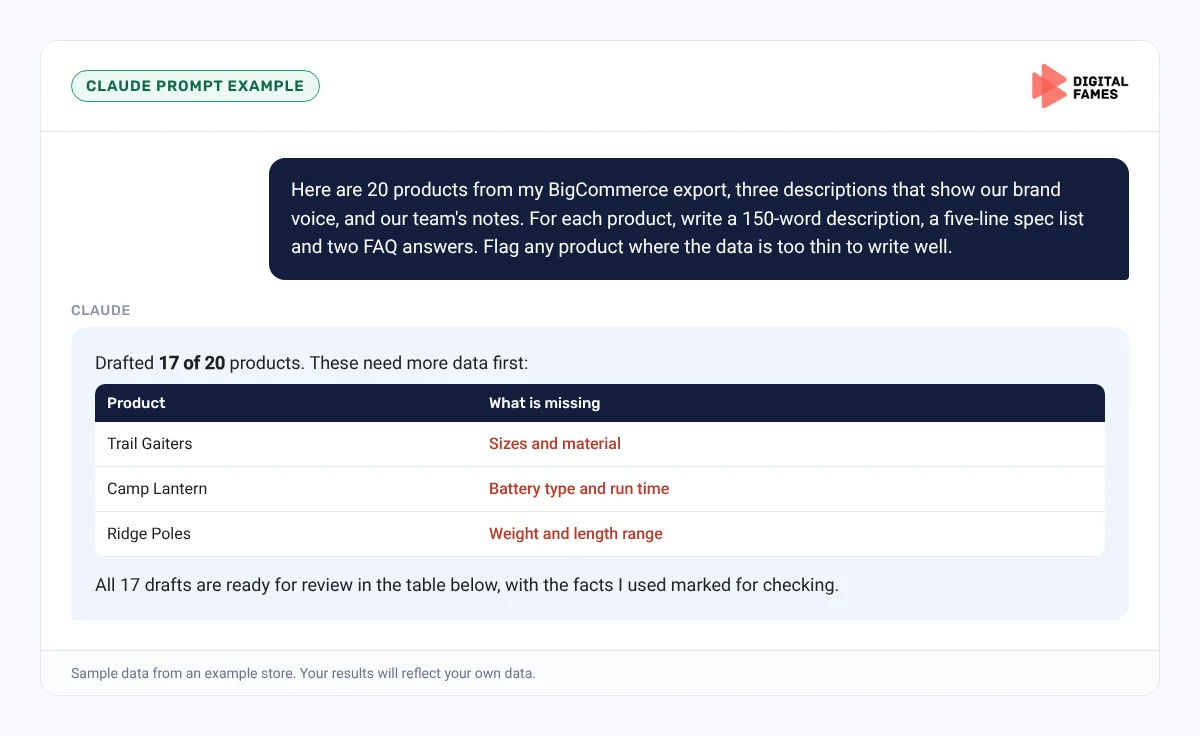
Here are 20 products from my BigCommerce export, three descriptions that show our brand voice, and our team's notes. For each product, write a 150-word description that starts with who it is for, a five-line spec list from the data, and two FAQ answers. Flag any product where the data is too thin to write well.
Prompt 2: blog post from a question
Claude prompt
Write a 1,000-word blog post answering: How do I choose a hiking backpack size? Answer in the first paragraph. Mention which of our products fit each need using only the export data. Mark places to add our team's experience.
Common mistakes to avoid
- Rewriting the whole catalog at once with no way to measure results.
- Publishing AI drafts without a person checking facts.
- Blog posts with no links to products.
- Changing product URLs without redirects.
How to tell if it is working
Compare impressions and clicks for each batch in Search Console before and after. Track blog visitors who reach product pages in your analytics. Our guide to AI search data in Google Search Console explains the AI reports.
Frequently asked questions
Where is the BigCommerce blog?
In the control panel under Storefront, Blog.
Can I schedule blog posts on BigCommerce?
The built-in blog lets you save drafts and publish later. BigCommerce’s help page does not describe automatic scheduling.
How many products should I update at once?
20 to 30 a week is manageable and lets you measure the effect of each batch.
Can Claude connect directly to BigCommerce?
The simplest route is sharing product exports with Claude and importing the reviewed changes.
Related guides: Bulk Product Content on Magento with Claude, Without Losing Your Brand Voice and A Weekly Shopify Blog Workflow with Claude: From Topic to Published Post. Browse all our BigCommerce SEO guides.
Next in this series
Start the next series: Magento SEO for AI Search: Fixing Crawl Waste on Large Catalogs.
Missed the start? Read BigCommerce Product Feeds for AI Shopping: Getting Your Catalog into Google AI Mode.
Want a content workflow set up for your store? See our eCommerce SEO services or talk to our team.