
Most Shopify product pages are written for one reader: a person scrolling on a phone. That still matters. But in 2026 the same page is also read by Google’s crawler, by Google AI Mode and by shopping assistants like ChatGPT and Gemini. Each one is looking for the same thing: clear facts about the product, in places it can find them.
This guide gives you a simple product page template that works for all of them. You will fix your titles, rewrite descriptions so they answer real questions, and check that your theme’s structured data says what your page says.
Quick summary
- A good product page puts the key facts in the title, the specs in fields, and the answers in the description.
- Google’s merchant listing markup needs only name, image and offer (price and currency) to start, but GTIN, brand, color, size, shipping and returns help.
- Your structured data must match the visible page. Mismatches cause problems.
- Shopify themes usually output product schema already. Your job is to feed them complete data.
- Claude can draft descriptions in your brand voice, but a person checks every fact.
What changed recently
- September 24, 2026: Google started its September 2026 spam update, listed on Google’s ranking updates page. It ran for almost 14 days. Google’s spam policies describe republishing content “without adding any original content or value” as spam, so copied manufacturer descriptions are a real risk.
- Current guidance: Google’s AI features and your website page says no special markup is needed for AI Overviews or AI Mode. It also says structured data should match the visible text on the page. Good product pages already do both.
The product page template
Use this layout for every product. Start with your 20 best sellers, then work through the rest.
1. Title: brand, product type, key attribute
Write the title the way a shopper would say it out loud. Include the brand, what the product is, and the one or two details that set it apart.
- Before: Ridge Socks
- After: Ridge Merino Wool Hiking Socks, Cushioned, Pack of 3
Keep it readable. A title stuffed with every keyword you can think of reads badly to shoppers and gives AI tools nothing extra.
2. Opening lines: who it is for and why
The first two sentences of the description should say who the product is for and the main reason to buy it. Many shoppers never read further, and AI answers often quote the opening.
3. Key specs in fields, not buried in text
Materials, size, weight, capacity, care and compatibility belong in Shopify’s product category, variant options and metafields. Your theme can then show them in a neat spec table, and they reach Shopify Catalog and your Google feed as structured data instead of loose text.
4. Answers to the questions shoppers ask
Add a short FAQ block to each product: sizing, fit, care, what is in the box, delivery and returns. Two short sentences per answer is enough. Use only facts you can stand behind.
5. Images with useful alt text
Show the product from several angles and in use. In Shopify, open the product, click an image and choose Edit alt text. Describe what the image shows, for example “Grey merino hiking sock, cushioned heel, side view”. Google’s image SEO guidance explains why descriptive alt text helps.
6. Search engine listing
At the bottom of each product, edit the search engine listing. Shopify suggests keeping the page title to about 60 characters and the meta description to about 160. Write a meta description that sells the click, not a list of keywords.
Schema made simple
Structured data is a small block of code that tells search engines the facts about your product in a format they can read. Google’s merchant listing documentation lists the basics:
- Required on the product: name, image and offers.
- Required on the offer: price and priceCurrency.
- Recommended: gtin, brand, color, size, material, aggregateRating, review, shippingDetails and hasMerchantReturnPolicy.
Most Shopify themes already output this markup from your product data. If your products have variants, Google’s product variants guide explains how to mark up the parent product and its variations so Google understands they belong together.
Google recommends
Google’s product structured data overview recommends providing both on-page structured data and a Merchant Center feed, because together they maximize your eligibility for shopping experiences in Search.
How to check your schema
- Open a product page and run it through Google’s Rich Results Test.
- Compare the price, availability and name in the result with what the page shows. They must match.
- Check one product with variants and one on sale. These are where themes most often get it wrong.
- If fields are missing, fix the product data first. Only change theme code if the data is complete and the markup is still wrong.
Watch out
If you install a separate schema app, check that your theme is not also outputting product markup. Two conflicting blocks of product schema on one page confuse search engines.
Do it faster with Claude
Rewriting hundreds of descriptions by hand is slow. With Claude’s Shopify connector, Claude can read your products and draft new descriptions in your brand voice. Keep the connector read-only while you review drafts. In part 1 of this series we covered how to connect it.
Prompt 1: rewrite a description in your voice
Claude prompt
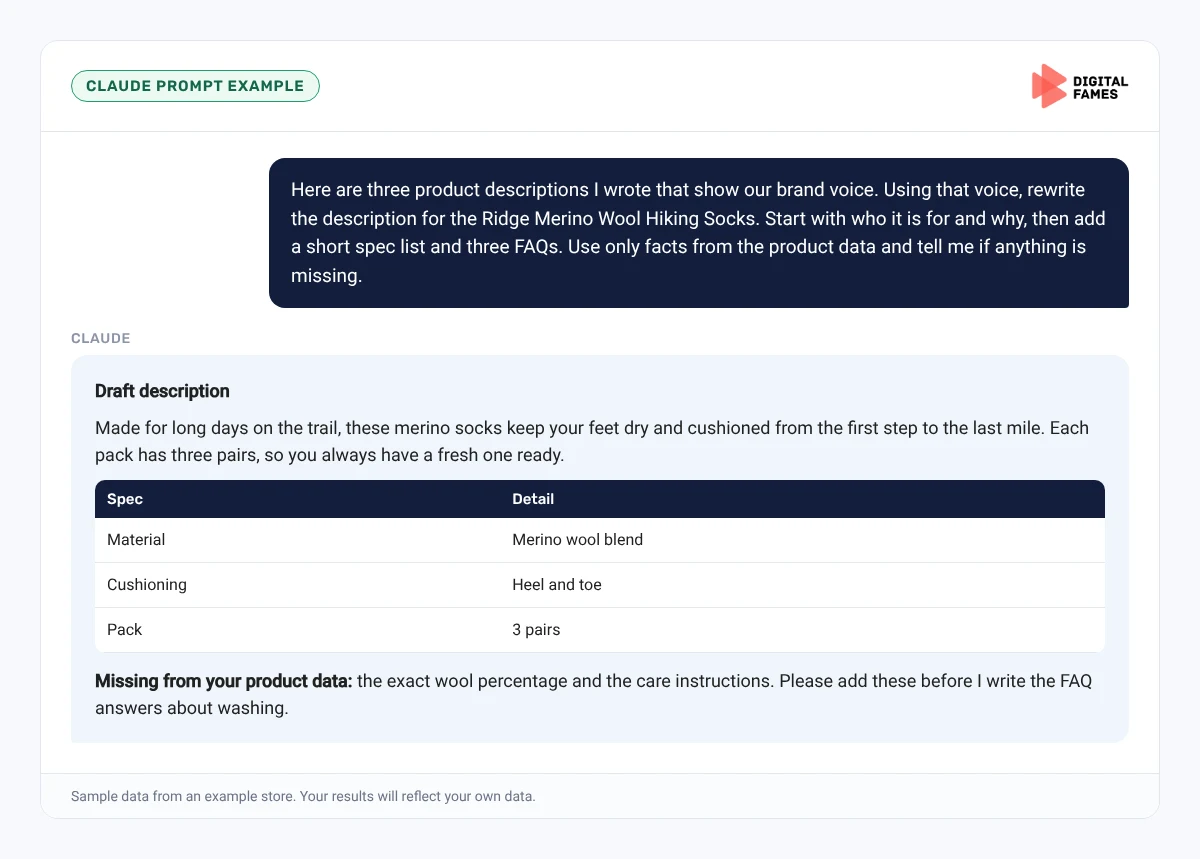
Here are three product descriptions I wrote that show our brand voice. Using that voice, rewrite the description for the Ridge Merino Wool Hiking Socks. Start with who it is for and why, then add a short spec list and three FAQs. Use only facts from the product data and tell me if anything is missing.
Prompt 2: check schema against the page
Claude prompt
Here is the structured data from one of my product pages and the text a shopper sees. List every place where the price, availability, name, brand or GTIN in the markup does not match the visible page.
What to check in Claude’s answer:
- Every fact is true for the real product.
- The voice sounds like your other pages.
- Nothing is published until you approve it.
Common mistakes to avoid
- Copying the supplier’s description onto every product.
- Putting sizes and materials only in images, where text-based systems cannot read them.
- Leaving variant images and prices the same for every option.
- Writing meta descriptions that are just keyword lists.
- Adding a schema app on top of theme schema without checking for duplicates.
How to tell if it is working
Track your updated products for 6 to 8 weeks. In Google Search Console, compare impressions and clicks on those product URLs before and after. Our guide to AI search data in Google Search Console explains what the AI reports show. In Merchant Center, watch for fewer warnings about missing attributes.
Frequently asked questions
Do I need to know code to add product schema on Shopify?
Usually no. Most themes output product structured data automatically. You make it better by filling in your product data completely.
How long should a Shopify product description be?
Long enough to answer the questions shoppers ask before buying. For most products that is 150 to 300 words plus a spec list and a few FAQs.
Is AI-written product copy against Google’s rules?
Google’s guidance on helpful content warns against producing large amounts of text with AI “without manual oversight or curation”. Use AI for drafts, and have a person check and edit every page.
Should every product have a GTIN?
If the product has a barcode, yes. Google lists gtin as a recommended property, and it helps match your product to what shoppers search for.
Related guides: WooCommerce Product Schema and Feeds: What Google AI Mode Actually Needs and Structured Data on Magento: Product, Offer and Review Markup That Holds Up. Browse all our Shopify SEO guides.
Next in this series
Next in the Shopify series: Turning Shopify Collection Pages into Pages AI Answers Quote.
Missed the start? Read How to Get Your Shopify Store Recommended in ChatGPT, Gemini and Google AI Mode.
Need help with your product pages? Our team handles Shopify store development and eCommerce SEO. Talk to us for a free audit.