
Google gets your product information from two places: the structured data on your product pages, and the product feed you send to Merchant Center. Google AI Mode and Google’s shopping results draw on both. If either one is incomplete or the two disagree, your products are less likely to show up.
This guide explains what each one needs on a WooCommerce store, in plain English, and how to check them.
Quick summary
- Google recommends using both on-page structured data and a Merchant Center feed.
- Required for merchant listings: product name, image, and an offer with price and currency.
- Recommended: GTIN, brand, color, size, material, reviews, shipping and returns.
- Your feed and your page must agree on price and stock.
- Claude can compare a feed export against your product data and list the gaps.
What changed recently
- September 24, 2026: Google’s September 2026 spam update started (see Google’s ranking updates page). Accurate data is part of being trustworthy. Never mark up prices, stock or reviews that shoppers cannot see on the page.
- Current guidance: Google’s AI features and your website page says no special schema is needed for AI Overviews or AI Mode, and that structured data must match the visible text.
Two sources, one set of facts
Google recommends
Google’s product structured data overview recommends providing both on-page structured data and a Merchant Center feed, and opting into free listings. Some shopping experiences combine both sources.
Think of structured data as the label on the product page, and the feed as the catalog you hand to Google. Both should say the same thing.
What your product schema needs
From Google’s merchant listing documentation:
- Required on the Product: name, image, offers.
- Required on the Offer: price and priceCurrency.
- Recommended on the Product: gtin, brand, color, size, material, aggregateRating, review.
- Recommended on the Offer: shippingDetails and hasMerchantReturnPolicy.
WooCommerce outputs the core product markup automatically. SEO plugins and schema extensions can add the recommended fields like brand and GTIN. The key is that only one tool outputs product schema, so you never get two versions with different prices.
Variable products
For products with sizes or colors, each variation should have its own price, stock and image. Google’s product variants guide explains how to describe the parent product and its variants so Google understands they belong together.
What your Merchant Center feed needs
The easiest route is Google for WooCommerce. Its setup guide covers connecting Merchant Center, choosing target countries, and syncing shipping. Once synced, check these in Merchant Center:
- Products with warnings or disapprovals, and the reason for each.
- Missing identifiers (GTIN or brand).
- Price or availability mismatches between the feed and the page.
- Missing shipping or return information for your target countries.
Watch out
If your price changes often, make sure your feed updates as soon as WooCommerce does. A sale that ended yesterday but still shows in the feed creates a mismatch.
How to check both in 15 minutes
- Pick five products: a simple product, a variable product, one on sale, one out of stock and one with reviews.
- Run each through Google’s Rich Results Test and note price, availability, brand and GTIN.
- Find the same five in Merchant Center and compare.
- Compare both with what a shopper sees on the page.
- Fix the product data in WooCommerce first, then check the feed updates.
Do it faster with Claude
Prompt 1: compare feed and store data
Claude prompt
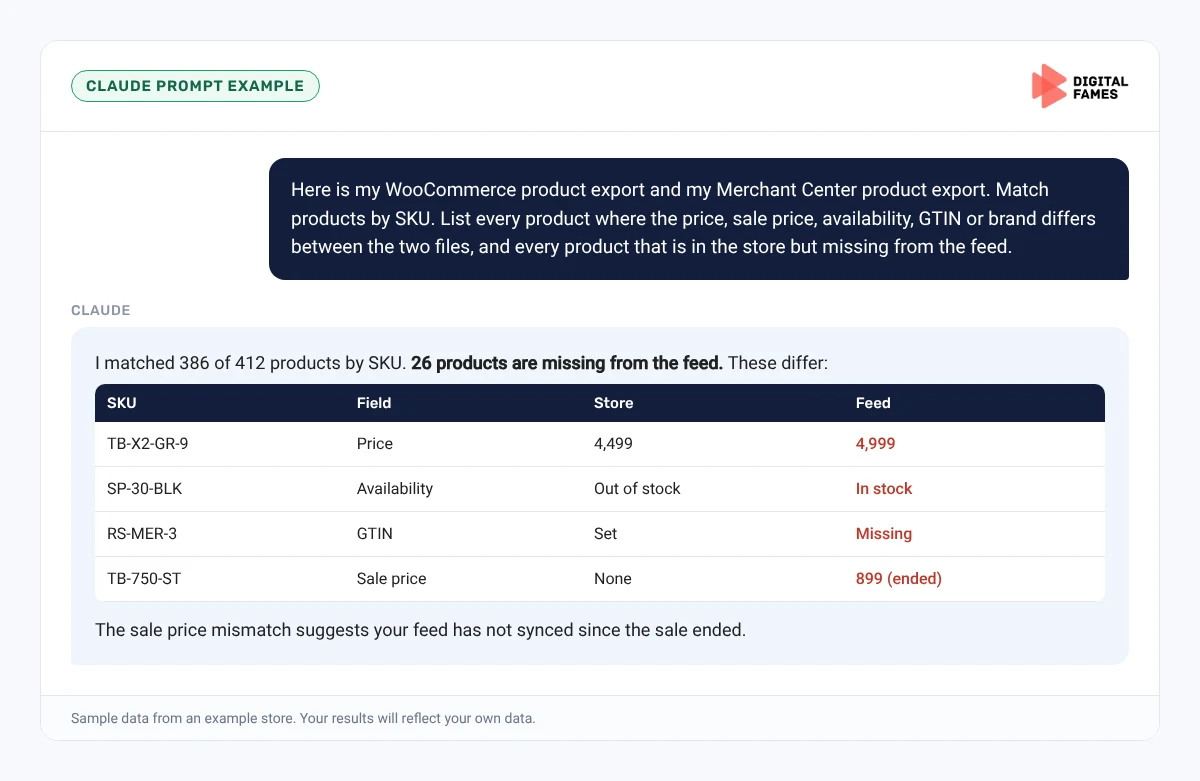
Here is my WooCommerce product export and my Merchant Center product export. Match products by SKU. List every product where the price, sale price, availability, GTIN or brand differs between the two files, and every product that is in the store but missing from the feed.
Prompt 2: explain a disapproval
Claude prompt
Here is the Merchant Center warning for this product and the product's data. Explain in plain English what is wrong and exactly which WooCommerce field I need to change.
What to check: Claude matched products by SKU correctly, and you fix data at the source in WooCommerce, not only in the feed.
Common mistakes to avoid
- Two plugins outputting product schema.
- Marking up review stars that are not visible on the page.
- Feed prices in a different currency or including tax differently from the page.
- Variations missing from the feed.
- Fixing data in Merchant Center instead of in WooCommerce, so it reverts at the next sync.
How to tell if it is working
Watch the number of approved products in Merchant Center and the impressions on product URLs in Search Console. Our guide on AI search data in Google Search Console explains the AI reports.
Frequently asked questions
Does WooCommerce add product schema by default?
Yes. WooCommerce outputs basic product structured data. Extensions and SEO plugins can add recommended fields such as brand and GTIN.
Do I need special schema for Google AI Mode?
No. Google says no special schema.org markup is needed for AI features. Complete, accurate product markup is enough.
What is the difference between product snippets and merchant listings?
Product snippets are for pages where people cannot buy directly, like reviews. Merchant listings are for pages where shoppers can buy from you, and support details like shipping and returns.
How often should my feed update?
As often as your prices and stock change. Many stores sync daily or whenever a product is saved.
Related guides: Shopify Product Pages AI Can Read: Titles, Descriptions and Schema Made Simple and BigCommerce Product Feeds for AI Shopping: Getting Your Catalog into Google AI Mode. Browse all our WooCommerce SEO guides.
Next in this series
Next in the WooCommerce series: Fixing Thin and Duplicate Product Content on WooCommerce After the September 2026 Spam Update.
Missed the start? Read Is Your WooCommerce Store Ready for AI Shopping? A Simple Checklist.
Need your schema and feed checked? Our eCommerce SEO and technical SEO teams can help. Talk to us.