When someone asks an AI assistant “what are the best hiking backpacks for beginners”, the answer is a short list with a few reasons for each pick. That is exactly what a good collection page can be: a short guide, followed by the products.
Most Shopify collection pages are just a grid of products with a title. This guide shows you how to turn them into pages that help shoppers choose, that Google can understand, and that AI answers can quote.
Quick summary
- Add a short buying guide to the top of your most important collections.
- Answer the real questions shoppers ask about the category in a short FAQ.
- Link from menus to collections and from collections to every product you want found.
- Keep filter URLs from creating endless near-duplicate pages.
- Claude can draft collection intros and FAQs from real customer questions.
What changed recently
- September 24, 2026: Google’s September 2026 spam update started, listed on Google’s ranking updates page. Collections filled with auto-generated text for every keyword variation are the kind of scaled content Google’s spam policies warn about. Write fewer, better collection pages.
- Current guidance: Google’s AI features and your website page says AI Overviews and AI Mode use the same SEO basics as normal search, including making content easy to find through internal links.
Why collection pages matter for AI search
Google’s guide to ecommerce site structure recommends a simple chain: menus link to categories, categories link to products. Google also uses the number of internal links to a page as a sign of how important it is. Your collections sit in the middle of that chain, so they shape how Google understands your whole store.
For AI answers, a collection page that explains the category is useful source material. A bare grid of product images is not.
Step by step: build a better collection page
1. Pick the collections that matter
Start with 5 to 10 collections that match how people shop: by product type (hiking backpacks), by need (waterproof gear) or by person (gifts for runners). Skip collections that exist only for internal use.
2. Write a short buying guide at the top
Add 80 to 150 words in the collection description: who these products are for, the two or three things to compare, and a quick tip. Keep the product grid visible without too much scrolling on mobile.
3. Add a short FAQ below the products
Answer four to six questions shoppers really ask about the category. Pull them from customer emails, chat logs, reviews and search queries in Search Console. Keep each answer to two or three sentences.
4. Write a clear search engine listing
Set a page title and meta description for every important collection. Shopify suggests about 60 characters for the title and about 160 for the description. Make the description a reason to click, for example the range of sizes or a free delivery threshold.
5. Link the chain properly
- Make sure your main menu links to your key collections.
- Link related collections to each other, for example backpacks to rain covers.
- Link from blog posts and buying guides to the relevant collection.
- Use normal links, not buttons that only work with JavaScript.
6. Keep filters from creating duplicate pages
Shopify filters can create many URL versions of the same collection, one for every color, size and price combination. Google’s faceted navigation guidance explains the risk: these combinations can waste crawling and slow down discovery of useful pages. Keep your main collection URLs as the pages you want indexed, and only create separate collections for filter combinations people actually search for, like “women’s waterproof hiking boots”.
Expert tip
Create a real collection for a popular filter combination instead of hoping Google indexes a filtered URL. A real collection gets its own title, description and FAQ.
Do it faster with Claude
Claude is good at turning messy customer questions into clean FAQs. Give it real material and ask it to stay within your facts.
Prompt 1: collection intro and FAQ from real questions
Claude prompt
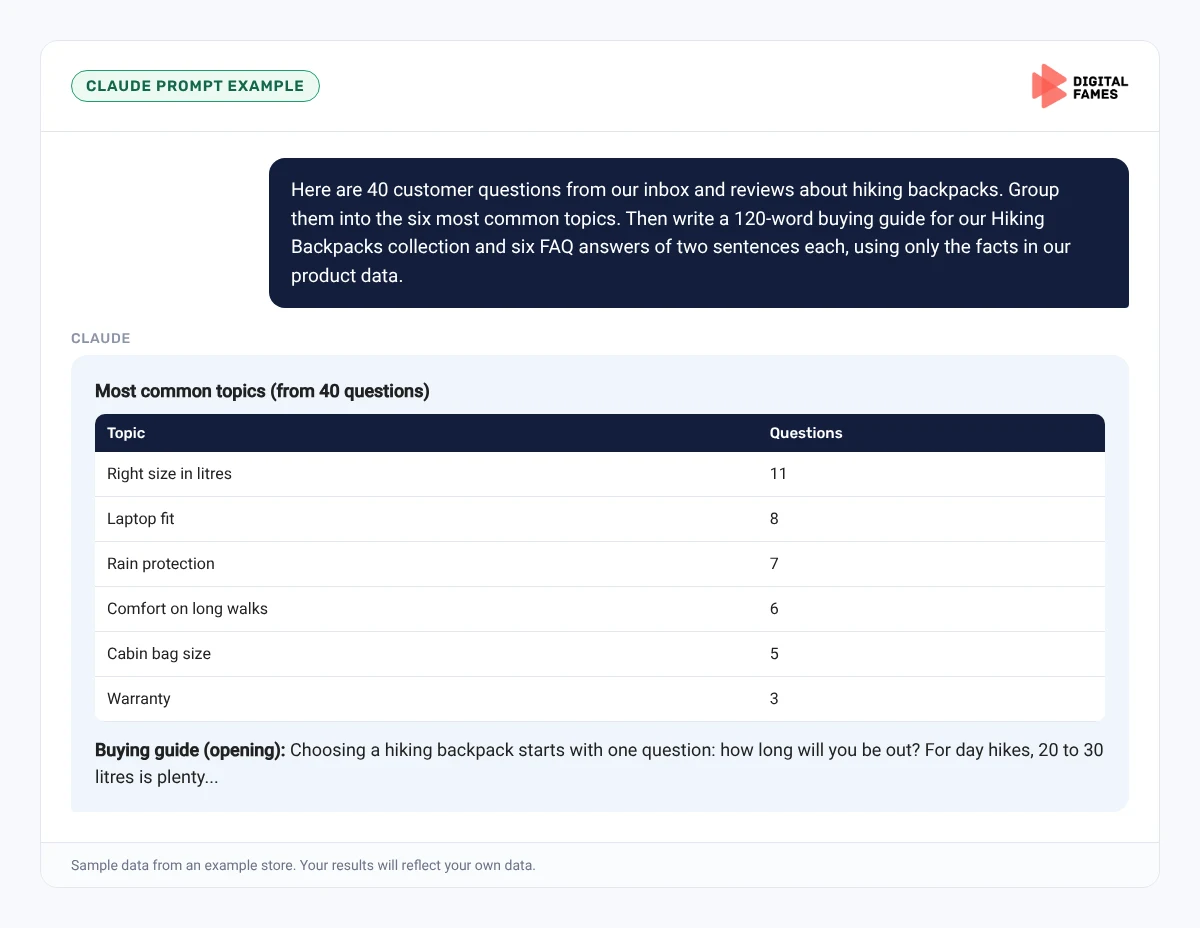
Here are 40 customer questions from our inbox and reviews about hiking backpacks. Group them into the six most common topics. Then write a 120-word buying guide for our Hiking Backpacks collection and six FAQ answers of two sentences each, using only the facts in our product data.
Prompt 2: find missing collections
Claude prompt
Here is a list of our collections and the top 100 search queries from Search Console. Which queries have no matching collection? Suggest up to five new collections and say which existing products would go in each.
What to check: claims about products are accurate, the FAQ answers match your real policies, and suggested collections have enough products to be useful (at least six to eight).
Common mistakes to avoid
- Writing 1,000 words of filler above the products so shoppers have to scroll forever.
- Creating dozens of near-identical collections for every keyword variation.
- Leaving collection pages with no search engine listing at all.
- Collections with only one or two products.
- FAQ answers that promise things your policies do not support.
How to tell if it is working
In Search Console, watch impressions and clicks for your updated collection URLs over 6 to 8 weeks. Look at which queries they start appearing for. Our guide to AI search data in Google Search Console explains how to read AI impressions.
Frequently asked questions
How long should a Shopify collection description be?
Around 80 to 150 words at the top is enough for most stores, plus a short FAQ below the products.
Should I add FAQ structured data to collection pages?
You can, but it is not needed for AI Overviews or AI Mode. Google says no special markup is required. Focus on clear, visible answers.
Will filtered collection URLs hurt my SEO?
They can waste crawling if there are many combinations. Keep your main collection URLs as the indexed pages and create real collections for popular combinations.
Can I use the same FAQ on several collections?
Avoid it. Each collection should answer the questions specific to that category.
Related guides: BigCommerce Category Pages and Filters: SEO for AI Search and Wix Product and Category Pages That Get Cited in AI Answers. Browse all our Shopify SEO guides.
Next in this series
Next in the Shopify series: A Weekly Shopify Blog Workflow with Claude: From Topic to Published Post.
Missed the start? Read How to Get Your Shopify Store Recommended in ChatGPT, Gemini and Google AI Mode.
Want collection pages that rank and convert? See our eCommerce SEO services or talk to our team.