For years, the question was “where do we rank on Google?” Now there is a second question: “what do ChatGPT, Gemini and Perplexity say when someone asks about our products?” Wix stores can answer that second question directly, with a report built into the dashboard.
This guide explains what Wix’s AI Visibility Overview shows, how to read each part, and how to turn it into a short list of fixes for your store.
Quick summary
- The AI Visibility Overview shows how often your site is mentioned in AI answers on ChatGPT, Gemini and Perplexity.
- You need a Premium plan and at least 50 unique visitors in the last 30 days.
- Tests run on questions you choose. You can store up to 50 and test up to 5 times a month.
- Use the competitor and source sections to see who AI tools trust in your category.
- Claude can turn the report into a ranked fix list.
What changed recently
- September 24, 2026: Google’s September 2026 spam update started, listed on Google’s ranking updates page. Chasing AI visibility with mass-produced pages is risky. Google’s spam policies cover scaled content abuse.
- Current guidance: For Google’s own AI features, the AI features and your website page says the normal SEO basics apply, with no special requirements. The Wix report helps you see the other AI assistants too.
Where to find it
The AI Visibility Overview sits in the Analytics section of your Wix dashboard, under Analytics overviews. According to Wix Help Center, you need a Premium plan and at least 50 unique visitors in the last 30 days. Below that, you will see “Not enough visitors yet”.
How to read the report
1. Choose the AI platform
Tabs at the top switch between ChatGPT, Gemini and Perplexity. Look at each one. Your visibility can be very different on each.
2. Site mentions
Your AI visibility score is the percentage of test questions where your site was mentioned. Click a question to see the full AI answer, whether you were mentioned or cited, your position in the answer and whether the question is branded or not.
3. Competitors by visibility score
This shows how competitors score on the same questions. If a competitor appears where you do not, open the answer and look at why: usually clearer product information, a buying guide, or more mentions on other sites.
4. Top sources by references
These are the sites AI tools used to build their answers. If review sites, directories or marketplaces appear often, that is where you need to be listed with accurate information.
5. Brand perception
An AI-written summary of how your brand comes across, with strengths and weaknesses. Read it carefully. If it repeats something out of date, find where that information lives and correct it.
6. Traffic from AI platforms
Sessions from AI platforms and when AI bots last crawled your site. For ChatGPT and Perplexity, you also see which pages were scanned.
Choose better test questions
The report is only as useful as the questions you test. Click Manage Questions to add, delete or regenerate questions, then Save and Test. Wix lets you run a test once a day, up to five times a month, and each test uses AI credits.
- Mix branded questions (“is [your brand] good for…”) with non-branded ones (“best waterproof hiking boots for beginners”).
- Use the words customers use, not your internal product names.
- Include questions about delivery, returns and sizing, not just “best X”.
- Keep a stable core of 20 questions so you can compare tests over time.
Expert tip
Run your first test, fix the top three issues, then test again a month later with the same questions. Changing the questions every time makes the score impossible to compare.
Turning the report into fixes
- Not mentioned at all: check your product and category pages answer the question clearly. Our guide to Wix product and category pages that get cited covers how.
- Mentioned but low in the answer: add specific facts AI tools can quote, like sizes, materials and prices.
- Competitors cited from a review site: make sure your products are listed there with correct details.
- Wrong information about your brand: update your About, shipping and returns pages, and your listings on other sites.
Do it faster with Claude
Wix offers an MCP connector that lets Claude work with your site. You can also simply copy the report into Claude.
Prompt 1: turn the report into a fix list
Claude prompt
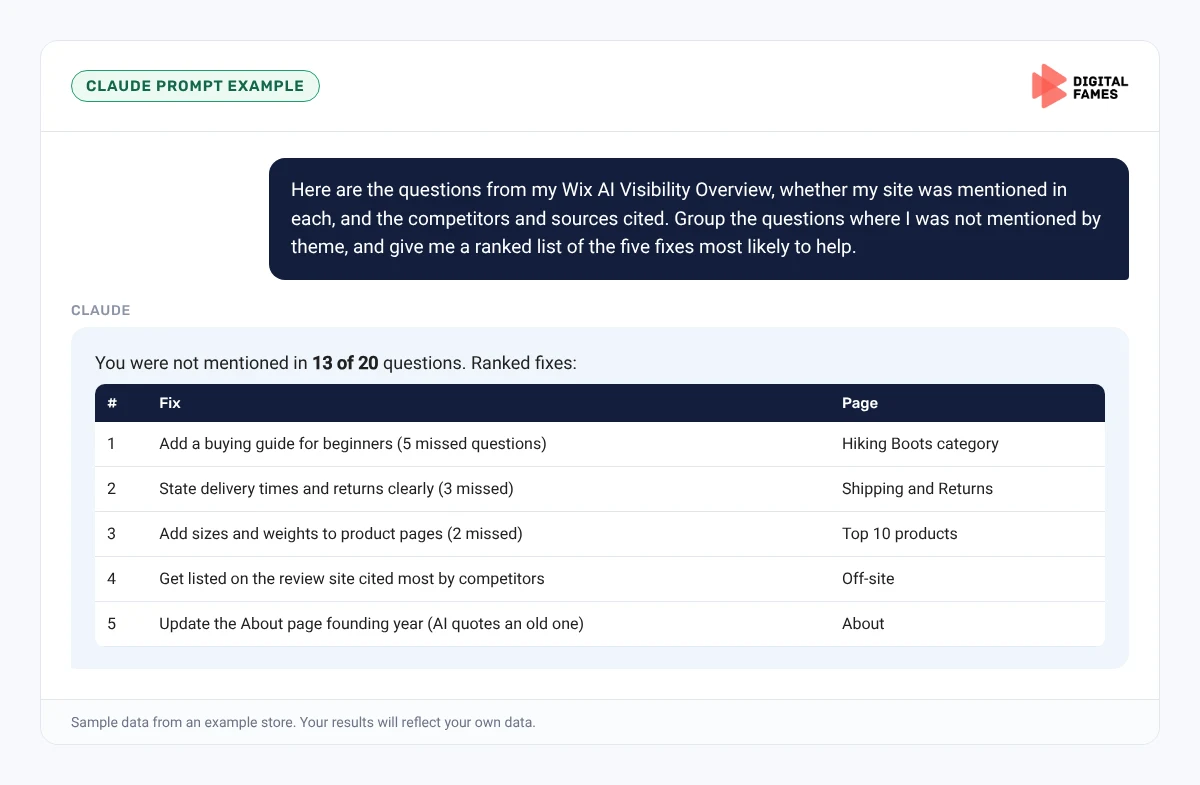
Here are the questions from my Wix AI Visibility Overview, whether my site was mentioned in each, and the competitors and sources cited. Group the questions where I was not mentioned by theme, and give me a ranked list of the five fixes most likely to help, with the page on my site each fix belongs on.
Prompt 2: better test questions
Claude prompt
Here are my 20 current test questions and my top 50 Search Console queries. Suggest 10 replacement questions that match how real shoppers ask about my products, half branded and half not.
Common mistakes to avoid
- Changing test questions every time, so results cannot be compared.
- Only testing branded questions, which flatters your score.
- Ignoring the sources list, which shows where AI tools get their facts.
- Creating dozens of thin pages to target every question.
How to tell if it is working
Track your visibility score on the same core questions each month, alongside Search Console impressions for your product and category pages. Our guide to AI search data in Google Search Console explains Google’s side.
Frequently asked questions
Which Wix plans include the AI Visibility Overview?
Wix says you need a Premium plan, and your site needs at least 50 unique visitors in the last 30 days.
Which AI platforms does it check?
ChatGPT, Gemini and Perplexity.
How often can I run a test?
Once a day, up to five times a month. Each test uses AI credits.
Does a higher score mean more sales?
Not on its own. Use it alongside AI traffic in the same report and your sales data.
Related guides: How to Get Your Shopify Store Recommended in ChatGPT, Gemini and Google AI Mode and Is Your WooCommerce Store Ready for AI Shopping? A Simple Checklist. Browse all our Wix SEO guides.
Next in this series
Next in the Wix series: Setting Up LLMs.txt and AI Crawler Rules on Wix Without Code.
Want help improving how AI tools see your brand? See our AI SEO services or talk to our team.