

Magento (Adobe Commerce) is built for big catalogs. That power comes with a common problem: layered navigation, sorting options and search pages can generate far more URLs than you have products. Search engines spend time crawling those, and your important pages wait.
This guide shows you how to find crawl waste on a Magento store and reduce it safely, so Google spends its time on the pages that matter.
Quick summary
- Layered navigation filters often add URL parameters, creating many near-duplicate pages.
- Google recommends robots.txt to stop crawling of filter URLs that should not be in search.
- Turn on Magento’s canonical meta tags for categories and products.
- Create proper category pages for filter combinations people actually search for.
- Claude can read a crawl export and group wasted URLs by pattern.
What changed recently
- September 24, 2026: Google’s September 2026 spam update started, listed on Google’s ranking updates page.
- Current guidance: Google’s AI features and your website page says AI Overviews and AI Mode rely on the same crawling and indexing as normal search. If Google cannot reach your best pages efficiently, they cannot be used in AI answers either.
Where crawl waste comes from
- Layered navigation filters on category pages, often added as URL parameters.
- Sort and display options, such as sort by price or products per page.
- Internal search result pages.
- Products available under several category paths.
- Session or tracking parameters added to internal links.
In Adobe Commerce, attributes become filters when Use In Layered Navigation is set to filterable, and layered navigation works on anchor categories (Adobe Commerce docs). More filterable attributes means more possible combinations.
Step by step: reduce the waste
1. Measure first
In Search Console, open Settings, then Crawl stats, and note which URL types get crawled most. Run a crawl of your store and export all URLs. Group them by pattern: filters, sorting, search, product paths.
2. Turn on canonical tags
In Stores > Settings > Configuration > Catalog > Catalog > Search Engine Optimization, set Use Canonical Link Meta Tag for Categories and Use Canonical Link Meta Tag for Products to Yes. Adobe recommends enabling both (Adobe Commerce docs). Google’s guide to consolidating duplicate URLs says rel=canonical is a strong signal.
3. Decide which filter URLs should be crawled
Google’s faceted navigation guidance gives two paths. If filtered URLs do not need to appear in search, use robots.txt to disallow crawling of them while allowing the main category URL. If some should be crawled, use the & separator, keep filter order consistent and return a 404 for empty combinations.
4. Make proper pages for popular combinations
Where people search for a filter combination, like “red running shoes”, create a real category with its own description instead of relying on a filtered URL.
5. Block internal search and sorting from crawling
Internal search results and sort options rarely need to be in Google. Disallow them in robots.txt, after checking none of them get meaningful traffic.
6. Limit filterable attributes
Only keep attributes filterable when shoppers really use them. Fewer, more useful filters are better for shoppers and for crawling.
Watch out
Do not use robots.txt to choose canonical URLs. Google’s canonicalization guide lists this as a common mistake, because blocked URLs can still be indexed without content. Use robots.txt for crawl control and canonicals for duplicates.
Do it faster with Claude
Prompt 1: group a crawl export
Claude prompt
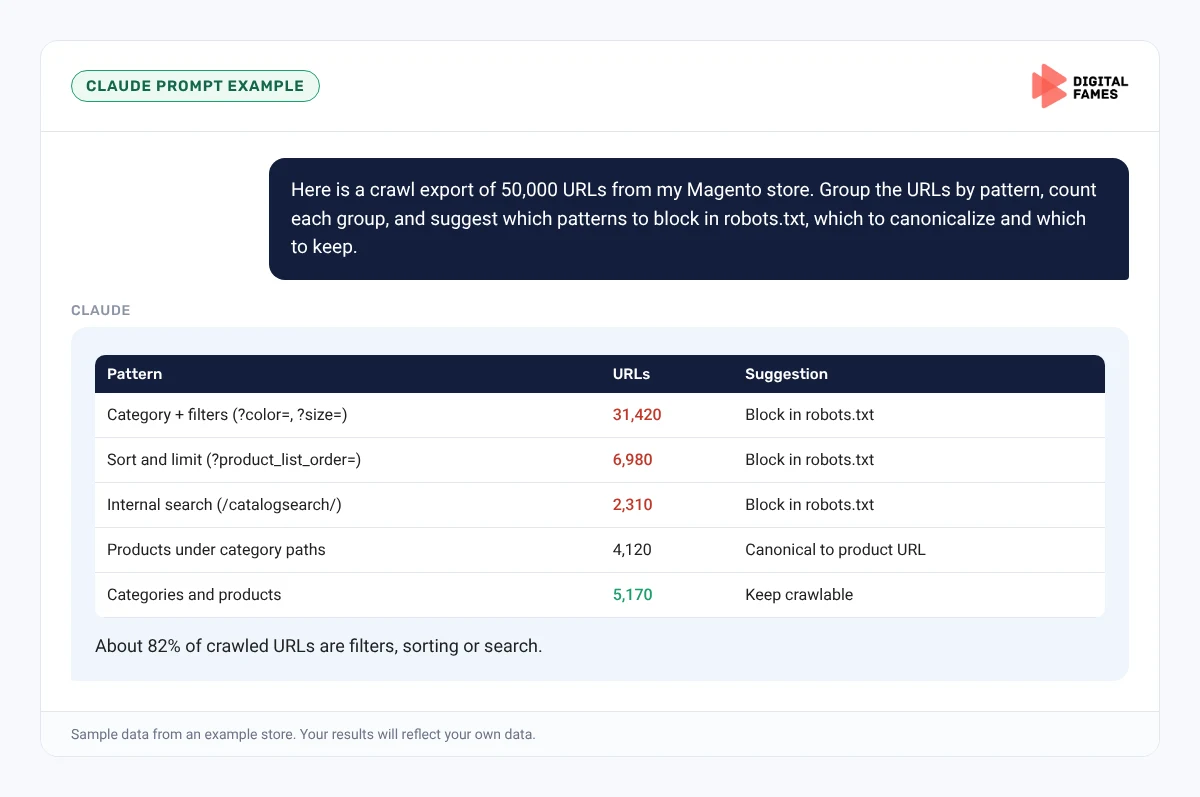
Here is a crawl export of 50,000 URLs from my Magento store with status code and indexability. Group the URLs by pattern (filters, sorting, search, product paths, other), count each group, and show three examples per group. Then suggest which patterns to block in robots.txt, which to canonicalize and which to keep.
Prompt 2: draft robots.txt rules
Claude prompt
Based on these URL patterns, draft robots.txt rules that block filter, sort and search URLs but keep category and product URLs crawlable. Explain each rule and list five real URLs from my export that each rule would block, so I can check them.
What to check: test every proposed rule against real URLs before it goes live. One wrong pattern can block a whole category.
Common mistakes to avoid
- Blocking category URLs along with filter URLs.
- Using noindex to try to pick canonicals.
- Making every attribute filterable.
- Changing robots.txt without measuring crawl stats first.
How to tell if it is working
Over the next few weeks, Search Console’s Crawl stats should show a higher share of crawling on product and category URLs. Track indexing and impressions for key categories. Our guide to AI search data in Google Search Console explains the AI reports.
Frequently asked questions
Does layered navigation hurt Magento SEO?
It can waste crawling on large catalogs if every filter combination is crawlable. Google explains how to manage this in its faceted navigation guidance.
Where do I turn on canonical tags in Magento?
In Stores, Settings, Configuration, Catalog, Catalog, Search Engine Optimization.
Should I noindex filter pages?
Google recommends robots.txt to prevent crawling of filter URLs that should not be in search. Noindex still requires crawling to be seen.
How long until crawl stats improve?
Usually a few weeks after the change. Measure before and after.
Related guides: BigCommerce Category Pages and Filters: SEO for AI Search and Setting Up LLMs.txt and AI Crawler Rules on Wix Without Code. Browse all our Magento SEO guides.
Next in this series
Next in the Magento series: Structured Data on Magento: Product, Offer and Review Markup That Holds Up.
Running a large Magento catalog? Our enterprise SEO and technical SEO teams can help. Talk to us.